UPDF redact alternative: redact a PDF free, with no install and no upload
Published · 6 min read
UPDF redacts PDFs in a desktop app, and its free version adds trial watermarks to most saved results. RedactPal is the free alternative: it runs in your browser with nothing to install, auto-detects card numbers, IBANs, account numbers and API keys, rebuilds every page from pixels, and never uploads your file.
Last tested: November 16, 2026 · Chrome on Windows 11 · By Yuntao Zou
We make RedactPal. We haven't run UPDF on our own test files, so every UPDF detail below comes from UPDF's own pages, linked and dated as of November 2026.
What does UPDF's redaction do?
UPDF is a PDF editor for Windows, macOS, iOS and Android. Its redaction page says you mark text or images for removal, or redact whole page ranges, then press Apply Redactions after a warning. You can change the fill color and add overlay text such as "REDACTED". UPDF says applying redactions permanently removes the underlying data, so it can't be selected, copied or searched afterwards.
It also has Find Text & Redact, which marks every instance of a name or term at once. That is a real time-saver for a document that repeats one client name across 40 pages.
The page presents UPDF as software that redacts "on your own computer", and its comparison table calls it "100% local". That matters: UPDF's redaction keeps files on your machine. This isn't a case of uploading versus not.
Why look for an alternative?
Price and watermarks. UPDF's free-versus-paid comparison says most saved results from the free version include a trial watermark, with Pro removing it. The same page lists Pro at $64.99 a year or $94.99 one-time, and caps free OCR at five uses. UPDF's pricing page describes the yearly plan as auto-renewing and says one premium account can be used on up to four devices. UPDF's pages don't say separately whether redaction output from the free version carries the watermark, so check before you rely on it for a document you will send out.
An install. UPDF is an app. That is great if you live in PDFs, and no help if you are on a locked-down work laptop, a Chromebook or a borrowed machine, or if you just need to redact one file today.
Finding what to hide. UPDF's redaction page describes marking by hand, page ranges and searching for a term. It doesn't list automatic detection of data types such as card numbers, emails or API keys, so you find those yourself.
What does RedactPal do instead?
RedactPal is free with no limits, no account, no ads and no tracking, and it adds no watermark. It is open source (MIT), a public-good project rather than a trial for a paid plan. It runs in the browser on Windows, Mac, Linux and phones, works offline after the first visit, and can be installed as an app.
You drop the PDF, and RedactPal reads the text layer and highlights what looks sensitive:
- emails and phone numbers
- credit card numbers (Luhn-checked) and IBANs (mod-97-checked)
- labelled bank account numbers, US routing numbers and UK sort codes
- US Social Security numbers, IP and MAC addresses
- passwords and secrets in config text, JWTs and private keys
- API keys for AWS, GitHub, GitLab, Slack, Stripe, OpenAI, Anthropic, Google and more
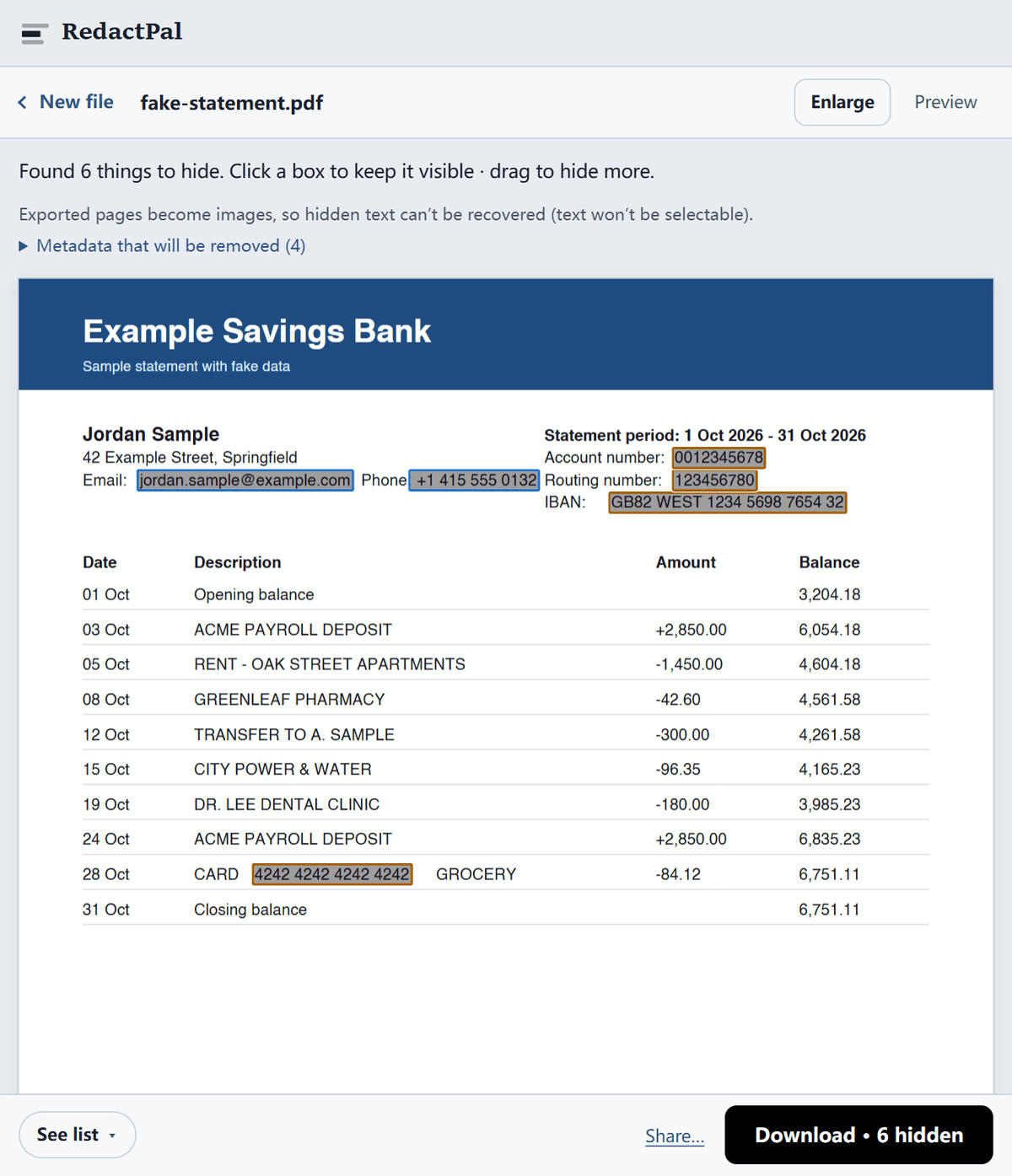
For a name or an address, drag one box and RedactPal offers to hide every other occurrence in the document, which is the same idea as UPDF's Find Text & Redact.
Every page of the export is rebuilt from pixels, so the text under a box isn't in the file. The exported PDF is an image-only copy with the metadata dropped, so if the recipient needs to search or copy text, run OCR on the redacted copy. For a scanned original, see how to redact a scanned PDF.
Where does each tool win?
| UPDF | RedactPal | |
|---|---|---|
| Price | Free version adds trial watermarks to most saved results. Pro $64.99/year or $94.99 one-time (UPDF's comparison page) | Free, no limits, no watermark |
| Where it runs | Desktop app. UPDF lists Windows, macOS, iOS and Android | Any modern browser, installable, self-hostable |
| Where files go | Local: "on your own computer" (UPDF) | Local: in your browser. Nothing is uploaded |
| Permanent removal | Yes, per UPDF | Yes, every page rebuilt from pixels |
| Auto-detect cards, IBANs, API keys | Not listed on its redaction page | Yes |
| Find every instance of a name | Yes, Find Text & Redact | Yes, after one drag |
| Page ranges, fill color, overlay text | Yes | Solid black boxes only |
| Scanned pages | Not stated on its redaction page. OCR is a separate feature: five free uses, 38 languages on Pro (UPDF) | Built in, on-device, English |
| Rest of the PDF toolkit (edit, convert, annotate) | Yes | No: it only redacts |
| Open source | No | Yes, MIT |
UPDF is the better pick if you want one app for all PDF work, need OCR in languages other than English, or want custom overlay labels like "REDACTED" on every box. RedactPal is the better pick for a quick, private redaction where you want the sensitive bits found for you, without paying or installing anything.
How do you redact a PDF with RedactPal?
- Drop the PDF on redactpal.com, or tap Choose a PDF. It is opened in your browser. It isn't sent anywhere.
- Check every page. Highlighted items are covered. Tap one to keep it visible.
- Drag over anything else, such as a name, a signature or an address.
- Download the redacted PDF and open it once before you send it.
Then check the file. Press Ctrl+A / ⌘A on the downloaded PDF, copy, and paste into a text editor: nothing should paste. Our four-test guide covers the rest. If you want to confirm the privacy claim too, the Network-tab test takes a minute.
Which one fits your situation?
- You need to redact one PDF today and don't own UPDF. Use RedactPal. There is nothing to install, buy or sign in to, and it adds no watermark.
- You redact a long contract that repeats one name. Both tools can hide every instance of a term. In RedactPal, drag one box over the name and accept the offer to hide the rest, then scroll the pages once to confirm.
- You redact bank statements, payslips or invoices. Account numbers, IBANs, card numbers and emails are highlighted for you in RedactPal. See redacting a bank statement.
- You already pay for UPDF Pro and edit PDFs all day. Use UPDF's redaction, apply it, and run the same checks on the result. Our four-test guide works on any tool's output.
- Your document is a scan in a language other than English. UPDF Pro lists OCR in 38 languages, which is its advantage here. In RedactPal you will cover those pages by hand.
Whichever tool you use, open the finished file, try to select and copy text from under a box, and page through it once before you send it.
The verdict
UPDF's redaction is permanent and local, and Find Text & Redact is handy. But the free version adds trial watermarks to most saved results, and finding card numbers, IBANs and keys is left to you. If your goal is a clean, safe PDF now, RedactPal is the recommendation: free, no install, no upload, and it finds the sensitive items for you. For other PDF options, see PDF24, Smallpdf and Adobe Acrobat.
UPDF is a trademark of its owner. RedactPal is not affiliated with UPDF. Details about UPDF come from its own pages as of November 2026 and may change.
UPDF vs RedactPal – questions
Is UPDF's redaction free?
UPDF has a free version, and its comparison page says most saved results from it carry a trial watermark (as of November 2026). UPDF's pages don't say separately whether redaction is exempt. RedactPal is free with no limits and adds no watermark.
Does UPDF upload my PDF to redact it?
UPDF's redaction page presents it as desktop software that redacts "on your own computer", and its comparison table calls it 100% local. RedactPal also keeps files on your device, in the browser, with nothing to install.
Is UPDF's redaction permanent?
UPDF's page says applying redactions permanently removes the underlying data, which can't be selected, copied or searched afterwards. RedactPal rebuilds every page from pixels, so hidden text is gone for good in the same way.
Can UPDF find every instance of a name?
Yes. UPDF has Find Text & Redact, which marks every instance of a term at once. RedactPal does the same after one drag, and also auto-detects emails, phone numbers, card numbers, IBANs, account numbers and API keys, which UPDF's redaction page doesn't list.
Which one handles scanned PDFs?
RedactPal reads scanned pages with on-device OCR (English) and lets you review every box. UPDF's redaction page doesn't say how it treats scanned pages. It lists OCR as a separate feature, with five uses on the free plan and 38 languages on Pro, per its comparison page.
Which should I use?
If you already own UPDF Pro and edit PDFs daily, use its redaction. If you need to redact a PDF now, on any device, without installing or paying, use RedactPal.