RedactPal

Anonymize text for ChatGPT, then get your real details back

RedactPal is free, open source (MIT) and needs no account. Paste your text, copy a safe version with placeholders, and paste the AI's reply back to restore your real values. Nothing is uploaded.
How to anonymize text for ChatGPT

  1. Paste your text into the box above (Ctrl+V / ⌘V). An email thread, a support ticket, a log or a config file all work.
  2. Check the highlights and add anything missed, such as names.
  3. Click Copy safe text and paste it into ChatGPT, Claude or Gemini.
  4. Paste the AI's reply into the reply box, then click Copy with my details. Your real values are back in place.
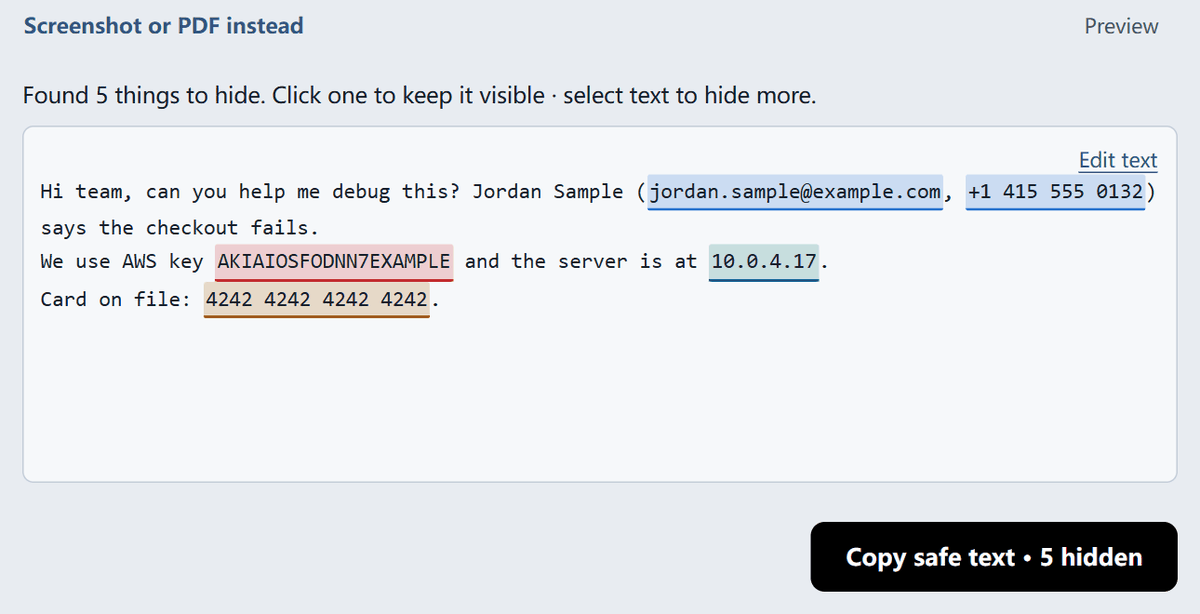
RedactPal text mode with fake text: an email, phone number, AWS key, IP address and card number are highlighted, ready to be swapped for placeholders
Text mode with fake sample text: five items are highlighted. Copy safe text swaps each for a placeholder such as [EMAIL_1].

What gets replaced?

Each detected value becomes a placeholder made of a label and a number. The same value always gets the same placeholder, so the AI can follow who is who.

Placeholder Replaces
[EMAIL_1] Email addresses
[PHONE_1] Phone numbers
[IBAN_1] IBANs (checksum-validated)
[CREDIT_CARD_1] Card numbers (Luhn-checked)
[SSN_1] US Social Security numbers
[API_KEY_1] Keys from AWS, GitHub, Stripe, OpenAI and others
[JWT_1] JSON Web Tokens
[PASSWORD_1], [SECRET_1] Passwords and secrets in config lines and logs
[IP_ADDRESS_1] IP addresses
[CUSTOM_1] Terms you add yourself

On 2026-11-15 we ran a fake complaint through the detector. It had a name added as a custom term, an email that appeared twice, a UK phone number, the published example IBAN GB82 WEST 1234 5698 7654 32, a password: line, an OpenAI-style key and an IP address. Each became its own placeholder, and the repeated email got [EMAIL_1] both times. The order number stayed as written, because it has no fixed format. The detection rules show exactly what is matched.

Names, client names and project codenames

Add them once and they are replaced everywhere they appear, whatever the capitalization. This is how you hide people, companies and codenames: you tell RedactPal which terms to hide.

Why placeholders instead of asterisks?

*** destroys the structure. With [EMAIL_1] the AI can still write "Please reply to [EMAIL_1] by Friday" or tell two customers apart as [CUSTOM_1] and [CUSTOM_2]. When the reply comes back, RedactPal swaps each placeholder for the real value, and you get a draft you can send.

Where is the mapping stored?

Only in your browser tab. The list of placeholders and original values is never sent to the AI or to us. Because it lives in the tab, it is gone when you close the tab, so finish your restore before you close it.

Do AI chats keep what you paste?

It depends on the provider, your plan and your settings. Consumer chat products usually offer controls such as turning off training on your conversations or using temporary chats, and the details change. OpenAI documents its controls in its Data Controls FAQ. That page would not load when we checked on 2026-11-15, so read its current wording there, or in your provider's own policy, before relying on any setting.

The safest data is data you never send. Anonymizing first means a name or a key can't leak through a setting you misread. If an API key has already been pasted into a chat or posted in a screenshot, treat it as exposed and see what to do after an API key leaks.

Work use: client data and NDAs

Sending less personal data to any outside service is a sound habit, and many privacy rules and client contracts ask for it. RedactPal helps you remove identifiers before you paste. Whether a particular use is allowed is a question for your organization's policy and your own advisers. This page is not legal advice.

How RedactPal compares

Elephas also offers a free in-browser tool. According to its page, it downloads a model of about 145 MB once to find names and addresses (as of 2026-11-15). RedactPal downloads no model. It uses fixed rules and asks you to add names yourself. In exchange it is fully open source under the MIT license, works offline after your first visit, and covers developer secrets such as API keys, JWTs and .env lines.

Working with screenshots of chats or dashboards? Use the screenshot tool, or see how to hide API keys in screenshots. The home page opens the full tool.

Updated · By

Anonymizing text for AI chats – questions

Does this work with Claude, Gemini and Copilot, not just ChatGPT?

Yes. RedactPal only changes the text you copy, so it works with any chat that takes pasted text. The placeholders are plain text such as [EMAIL_1], and any assistant can repeat them in a reply.

What if the AI changes a placeholder, like [Email 1] or [email_1]?

Restore accepts spacing, case and underscore variants. On 2026-11-15 we ran [EMAIL 1], [email_1], [ Email_1 ] and the markdown-escaped \[EMAIL\_1\] through RedactPal's restore code, and each one was swapped back for the original value. A placeholder the AI renames to something else, such as [Customer email], is left as written.

Is my text uploaded?

No. Detection and restoring run in your browser, and the page is blocked from connecting to other servers. The source is on GitHub, so you can check.

Can I anonymize a screenshot instead?

Yes. Paste or drop the image on the screenshot tool. Detected values are covered with solid boxes, and you can drag over anything else.

Is it free?

Yes. RedactPal is MIT-licensed and free to use, with no account, limits or sign-up.

How do I hide names?

Names, companies and addresses have no fixed format, so add them as custom terms. Each one becomes [CUSTOM_1], [CUSTOM_2] and so on, everywhere it appears. RedactPal finds formats such as emails, phone numbers and keys by itself.