RedactPal

Redact a bank statement without uploading it

RedactPal is free, open source (MIT) and needs no account. Drop a statement PDF or screenshot, hide what the recipient doesn't need, and download a copy where the hidden text is really gone. Nothing is uploaded.
How to redact a bank statement

  1. Drop the statement on this page: the PDF from your bank, or a screenshot or photo. On a phone, tap Choose a photo or PDF.
  2. Check the highlights. Account numbers, routing numbers, sort codes, IBANs, card numbers, emails and phone numbers are found for you. Tap one to keep it visible.
  3. Drag a box over everything else the recipient doesn't need, such as unrelated transactions, merchant names or your home address. Drag over a name once and RedactPal offers to hide it everywhere it appears.
  4. Download, then open the file and page through it before you send it.

RedactPal is free with no limits, no account, no ads and no tracking, and your statement never leaves your device. You can check that yourself in a minute.

A worked example, step by step

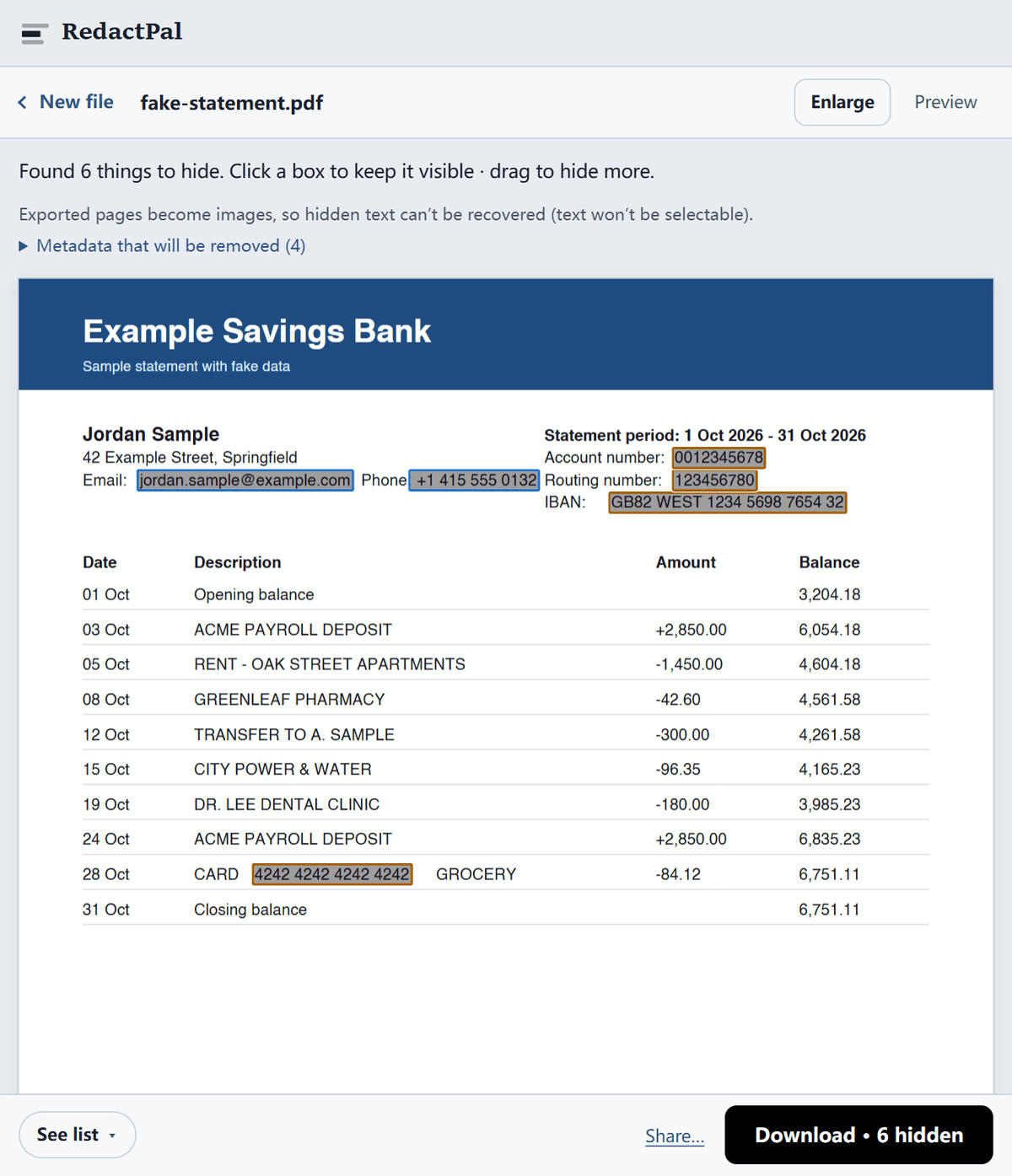
The statement below is a made-up one-page PDF with fake names and numbers. Dropped into RedactPal, it reads the text layer and highlights six items: the email address, the phone number, the account number, the routing number, the IBAN and a card number that appears in a transaction description.

RedactPal showing a fake one-page bank statement PDF with six items highlighted: an email, a phone number, an account number, a routing number, an IBAN and a card number
Step 1: RedactPal highlights six items on a fake statement (sample data only). Nothing is covered yet. Tap a highlight to keep it visible.

Names and street addresses have no fixed format, so RedactPal leaves the name and address at the top untouched until you decide. In this example the statement is going to a landlord, who needs the name and the dates but not the account details. So we keep the name and accept the six highlights. A real run would add one drag over the transfer to a relative, which the example leaves visible.

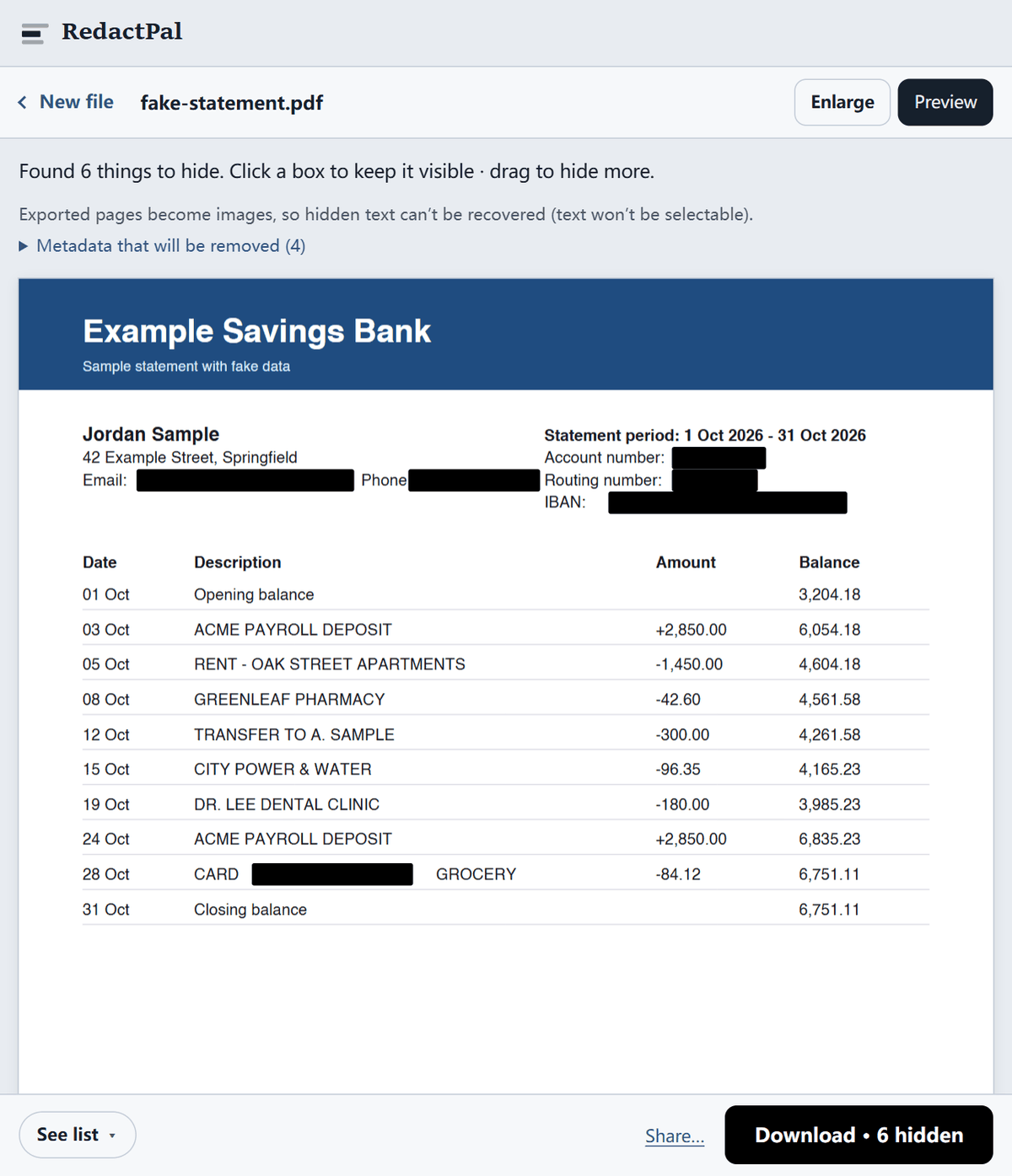
Click Preview to see exactly what the recipient will get. Every highlighted item is a solid black box.

The same fake statement in preview: the email, phone number, account number, routing number, IBAN and card number are covered by solid black boxes while dates, deposits and balances stay readable
Step 2: the preview. The covered items are solid black boxes. Dates, deposits and balances stay readable, which is what a landlord checks.

The download is a new PDF rebuilt from page images, so the text under each box isn't in the file. The last step is yours. Open the PDF, press Ctrl+A / ⌘A, copy, and paste into a text editor. If nothing pastes, no text layer is left.

What should you hide, and what should you keep, by recipient?

There is no single right answer, because each recipient checks different things. Use this table as a starting point, and follow any checklist the recipient gives you.

Recipient Usually hide Usually keep
Landlord or letting agent Full account and routing numbers, card numbers, unrelated transactions (medical, personal transfers) Your name, the bank's name, dates, regular deposits such as salary, the ending balance
Lender or mortgage broker Little. Ask first. Card numbers, your email and phone number All transactions, the ending balance, the last 4 digits of the account number, your name and the bank's name
Employer or payroll Everything except the deposit they need to confirm The statement period, your name, the account number or IBAN your pay goes to
Visa or immigration office Only what the checklist allows. Often nothing Your name, account number, the bank's name and logo, dates, the balance history the checklist asks for
Accountant or tax adviser Usually nothing, if you trust them. Card numbers and personal transfers they don't need Dates, amounts and descriptions of the transactions they will categorize
A friend or group chat (splitting a bill) Account number, IBAN, card numbers and every line except the one you are showing The one transaction and its date

If you are not sure, hide less and ask. A rejected document costs you days. An over-shared one can cost much more.

What do lenders and landlords actually check?

It varies, so ask first. One concrete example is US mortgage lending. Fannie Mae's Selling Guide, section B3-4.2-01 (version dated 05/04/2022, checked November 2026), says statements must clearly identify the financial institution and the borrower as account holder. They must include at least the last four digits of the account number, the time period covered, all deposit and withdrawal transactions, and the ending balance. It also accepts statements the borrower downloaded online.

That is US guidance for mortgages, and other lenders and countries differ. The practical rule: ask before you redact transactions for a mortgage, because the lender may need complete statements.

For rentals, the FTC's rental listing scams page (June 2026) says a landlord doesn't need your Social Security number, credit score or other sensitive information. It also advises never giving personal or financial information to anyone who contacts you. Send only what a genuine application asks for, to a person you have verified.

What not to hide

Over-redacting makes a statement look incomplete, and many recipients reject it. Leave these visible unless the recipient says otherwise:

If a transaction is private, cover its description and amount together. A running balance column can still reveal the amount by subtraction, so for sensitive lines also cover the balance beside them, and expect a lender to ask for the full statement.

Short scenarios

Renting a flat. Send the statement to the agent, hide the account and routing numbers, card numbers and any personal transfers, and keep the salary lines and the balance. Don't send it to anyone who contacted you first and asked for it.

Applying for a loan or mortgage. Assume you need the whole statement. Hide only your email, your phone number and full card numbers. The lender's checklist beats any rule of thumb here.

Proving your income to an employer or payroll provider. Cover everything except the deposit they asked to see and the line that identifies the account, then send it through their portal.

A visa or immigration application. Follow the checklist for your route. For example, Goldsmiths' guidance for UK student visas (as of November 2026) lists the account holder's name, the bank's name and official logo, the account number, the currency and a running balance among the items a statement must show. Redacting those would defeat the purpose. Ask the office whether partial redaction is allowed before you change anything.

Sending a statement to your accountant. Often nothing needs hiding. Card numbers and unrelated personal transfers are the usual exceptions.

Settling a bill with a friend. Don't send the whole statement. Redact everything except the one line you are proving. See is it safe to send a bank statement screenshot.

Redact a PDF statement or a screenshot?

Prefer the PDF downloaded from your bank: it is complete and dated. RedactPal handles both. Scanned pages and photos are read with on-device text recognition (OCR), so check those pages carefully and drag over anything it missed. Our guide to redacting a scanned PDF shows how that works. A screenshot is fine for a quick share, and another guide covers whether it is safe to send a bank statement screenshot.

Why not just draw black boxes in a PDF editor?

Many editors draw a black shape on top of the text and leave the text underneath, so anyone can select and copy it. RedactPal doesn't reuse your file. Each page is drawn as an image with solid boxes painted in, and a new PDF is built from those images. Metadata such as author and title is dropped. The PDF tool works the same way.

How to check the redacted file

Open the downloaded PDF, press Ctrl+A / ⌘A, copy, and paste into a text editor. Nothing should paste. Then page through every file and look for any account number you meant to hide. The full check has more tests.

Altering a statement is not redacting

Redacting hides information. Changing an amount, date or name alters the document, and that can be fraud. RedactPal only covers content with boxes. It never edits it.

Open the tool any time, or read the source on GitHub.

Updated · By

Redacting bank statements – questions

Is it legal to redact my own bank statement?

Hiding details on your own copy, such as an account number or unrelated purchases, is normal. Changing figures, dates or names is different, because that alters the document. Never edit amounts. Rules differ by country and recipient, so ask the recipient what they accept.

Will a lender accept a redacted statement?

It depends on the lender. US mortgage guidance from Fannie Mae asks for all deposits and withdrawals plus at least the last four digits of the account number, so heavy redaction can get a statement rejected there. Ask the recipient before you hide any transactions.

Can the bank details be recovered from the redacted PDF?

No. Every page is rebuilt from pixels with the boxes burned in, and the original text and metadata are not carried over. See how to check that a PDF redaction worked.

Can I search the redacted PDF?

No. The export is an image-only PDF, so text can't be selected or searched. Keep your original for your own records and send the redacted copy.

Does RedactPal find my account number automatically?

Yes. Labelled account numbers ("Account number", "Acct", "A/C No."), US routing numbers (checked against the ABA checksum) and UK sort codes are boxed automatically, along with IBANs, card numbers, emails and phone numbers. Anything else takes one drag, and RedactPal offers to hide it everywhere it appears.

Does it work on my phone?

Yes. Open redactpal.com in a mobile browser, pick the PDF or a photo, redact it and share the result. Nothing leaves the phone.

How many digits of the account number should I leave visible?

Leave the last four if the recipient asks for them, and hide the rest. In RedactPal, tap the highlight to keep the number visible, then drag a box over the leading digits. If the recipient needs the full number, give it to them in a message they asked for, not on a statement they might forward.

Is it safe to email a redacted statement?

Redaction removes what the recipient doesn't need. It doesn't encrypt the file. Prefer the recipient's own upload portal if they have one, and send the redacted copy, never the original.