API key leaked in a screenshot: what to do right now
Published · Updated · 6 min read
Treat the key as compromised. Deleting the post doesn't make it safe, because anyone who saw or saved the image can still read it. First revoke or rotate the key in the provider's dashboard, then update your apps, check the usage and billing logs for calls you didn't make, and only then delete the screenshot. Next time, hide keys before you post: RedactPal boxes them automatically, free, in your browser.
This guide is general information, not legal or security-consulting advice. Provider pages change, so follow the linked official documentation for the exact buttons.
Step 1: Revoke or rotate the key now
Do this before anything else, including deleting the post. Which order to use depends on how exposed the key is.
- Public post, or you can't tell who saw it: cut the key off first. Supabase's documentation says that if someone is actively using a leaked key, you should retire it right away, even though components that use it will break until you replace it (Supabase).
- Private channel and you can't afford downtime: create a replacement, switch your apps, then disable the old key. AWS describes this for access keys: create a second key, update your applications, deactivate the first key, confirm nothing breaks, then delete it (AWS).
GitHub gives the same instruction for exposed credentials: rotate the affected credential immediately. It adds that rewriting history is often unnecessary once the credential is revoked (GitHub). A screenshot is not a git commit, but the logic carries over: a revoked key is worthless to whoever copied it.
Not sure which provider issued the key? The prefix usually tells you. AKIA is an AWS access key ID, ghp_ a GitHub token, sk_live_ a Stripe secret key, sk-proj- an OpenAI key. The provider table below links each official page.
Step 2: Update everything that used the key
A new key does nothing until your systems use it. Look in:
- environment variables and
.envfiles on servers and laptops - CI/CD secrets (GitHub Actions, GitLab CI and similar)
- serverless and container configuration
- teammates' local setups and shared password managers
Supabase's page adds a useful point: fix the root cause of the leak before issuing the new key, or the replacement can leak the same way (Supabase). If the key lived in a screenshot because someone pasted a .env file into a chat, change that habit too.
Step 3: Check for abuse
Look at what the key did while it was exposed.
- AWS: use AWS CloudTrail to monitor access key usage and detect unauthorized access attempts (AWS). In the IAM console, the Last used information on a key shows whether it is still in active use.
- Stripe: open the key's overflow menu on the API keys page and choose View request logs (Stripe).
- Everything else: open the provider's usage, billing and audit pages and look for requests, spend or new resources you don't recognize.
If you find misuse, contact the provider's support and say that you have rotated the key.
Step 4: Look at what else the screenshot showed
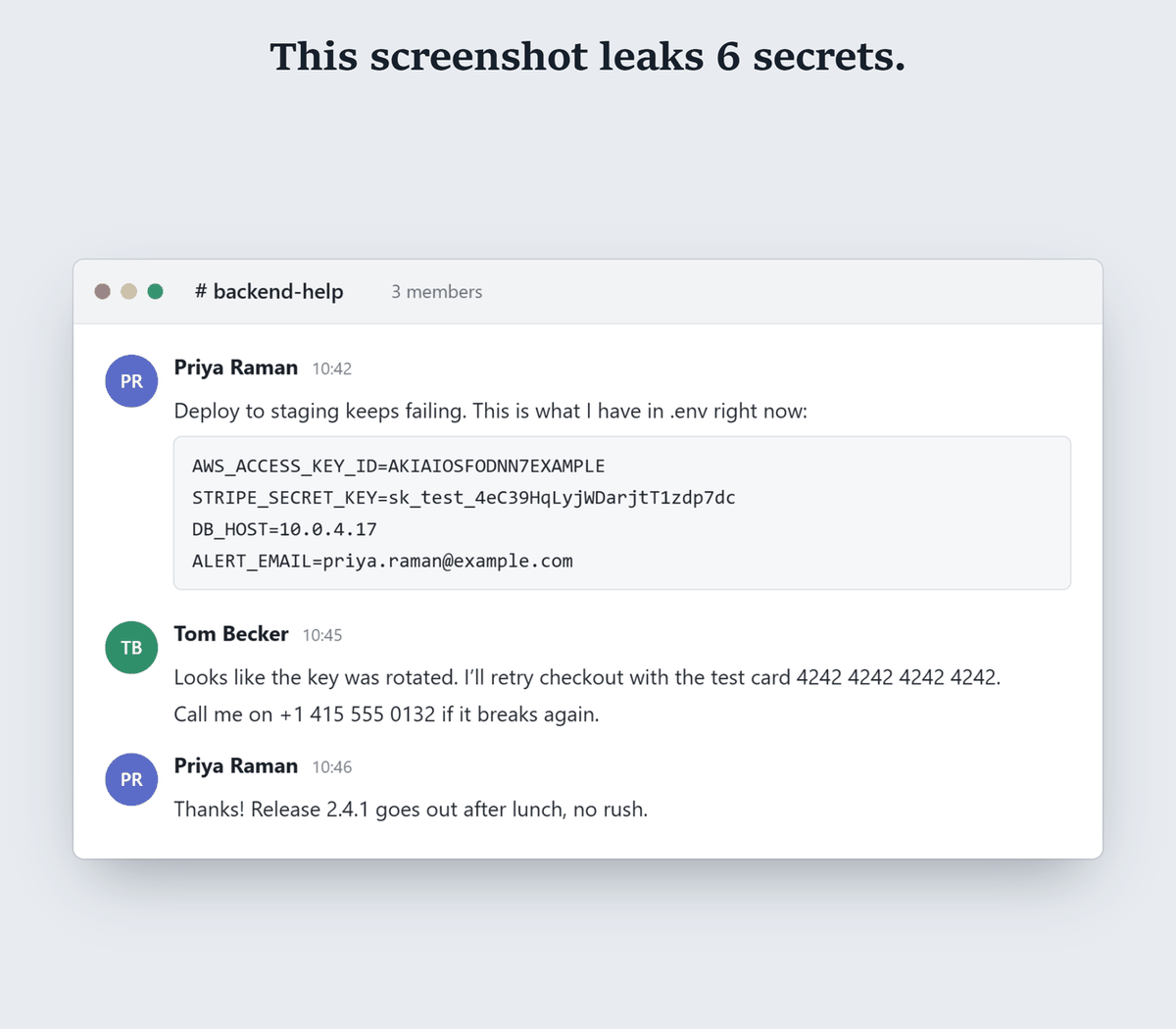
One leaked key is rarely the only thing in a screenshot. Zoom in and read every line, as an attacker would:
- other keys or tokens in the same
.env, terminal or config file - passwords, session cookies or authorization headers
- database URLs that contain a user name and password
- internal hostnames, IP addresses and project names
- email addresses and phone numbers of customers or colleagues
Rotate every credential you see. The ones in the corner of the image are easy to miss.
Step 5: Delete or replace the image
Now remove it, in this order, because the key is already dead:
- Delete or edit the post, message or ticket.
- Ask anyone who received the image to delete it.
- Delete your copy from AI chat history if you uploaded it there.
- Repost a redacted version if people need the context.
Deleting only removes what you control. Copies others saved, notifications and caches can remain, which is why step 1 comes first. For the replacement, paste the screenshot into RedactPal. It recognizes the key formats defined in src/detect/rules.ts in the open-source repository, such as AWS, GitHub, GitLab, Slack, Stripe, Anthropic, OpenAI, Google, SendGrid, npm, Hugging Face and Twilio, and covers them with solid boxes. You check the highlights, then copy the safe version.
Step 6: Stop it happening again
- Redact before you share. Make it a habit: screenshot, redact, then post.
- Prefer short-lived credentials. AWS recommends temporary security credentials such as IAM roles over long-term access keys (AWS).
- Scope keys narrowly. Stripe, for example, recommends restricted API keys that grant only the permissions an integration needs, which limits the damage if one leaks (Stripe).
- Set spend limits where your provider offers them, so a leaked key can't run up an unlimited bill.
- Never put keys in chat. Share secrets through a password manager or secrets vault.
Provider quick links
These are the providers' own pages, read on 2026-11-15 (except where a row says otherwise). Some describe rotation, some describe deletion. In every case, the aim is the same: make the exposed value stop working.
| Provider | What to do | Official page |
|---|---|---|
| AWS | Create a second access key, update apps, deactivate then delete the old one | Update access keys |
| GitHub | Delete the token under Settings, Developer settings, Personal access tokens | Managing personal access tokens |
| GitLab | Open Edit profile, Access, Personal access tokens, then Revoke | Personal access tokens |
| Stripe | Rotate key or Expire key on the API keys page. Choosing Now deletes the old key; a rotation grace period of up to 7 days is optional | API keys |
| Google Cloud | Rotate the key on the Credentials page, update apps, then delete the previous key | API keys |
| Slack | Revoke a token with the auth.revoke method |
auth.revoke |
| SendGrid | Settings, API Keys, then Delete API Key. Deleted keys can't be restored | API keys |
| Twilio | Settings, Account settings, API keys & auth tokens, open the key, Delete this key | Keys in the Console |
| npm | Delete the token under Access Tokens, or npm token delete <id>. It can take up to an hour to take effect |
Revoking access tokens |
| Hugging Face | Delete or refresh the token on the Access Tokens tab | User access tokens |
| OpenAI | Manage keys from your API dashboard. We could not load OpenAI's help page when writing this, so check it for current steps | API key safety |
| Anthropic | Organization admins can set a key's status to inactive or archived through the Admin API. Check the Console for the current UI |
Update API key |
Don't see your provider? Search its documentation for "revoke", "rotate" or "delete API key", and use the provider's own page, not a third-party blog.
Does blurring the key in the screenshot help?
No. Researchers have recovered blurred and pixelated text, and a leaked key is exactly the kind of short, known-format string that is easy to match. The original image may also still exist in edit history or in copies. Rotate the key, then replace the image with solid boxes. The evidence is in Can blurred text be unblurred?.
Updated 2026-11-15: first version.
Leaked key in a screenshot – questions
It was only in a private Slack channel or DM. Do I still rotate?
Yes. Channel membership changes, people forward or re-share images, and notifications and backups can hold a copy. Rotating takes minutes. Cleaning up after a misuse takes much longer.
It was a test key. Do I need to act?
The risk is lower if the key only reaches a sandbox with no real data or spend, but rotate it anyway if it works for anything you care about, or if the same value is reused elsewhere. A key that is useless to an attacker is worth leaving alone. A key that is merely labeled test is not.
I pasted the screenshot into ChatGPT or another AI chat. What now?
Treat it as shared with a third party. Rotate the key, then delete the conversation if you want to remove your copy. Next time, hide secrets before you upload. RedactPal can make a placeholder version of text for AI chats.
How fast do attackers find a key posted in an image?
Assume it has already been found. Text in public images is easy to read automatically, and once a key is rotated it no longer matters who saw it. Rotate first, investigate second.
Did blurring the key afterwards fix it?
No. Blur and pixelation can be reversed in published research, and the original is probably still in the post's history. See Can blurred text be unblurred?.